Find yourself with a journey

590f35719e18241313cdd03f87ba0de0f711622a
590f35719e18241313cdd03f87ba0de0f711622a8efba369-9d80-4b9a-b6ac-1649a47ed2e2.jpeg111f6852-39cc-43df-954d-aa87133329de.jpeg

DIY Sensor-equipped cello bow

Gyro/accel-based controller on a

cello bow

Elide Sulsenti © 2021


facebook
youtube
instagram

Investigating interactions between gesture and sound; guide how to build the instrument; future projects & more

How to build a sensor-wifi device for a string instrument's bow


This guide explains how to build a bow equipped with motion sensors (gyroscope and accelerometer), using an MPU6050 module and two ESP8266 boards. The system captures the bow’s movement data and sends it via Wi-Fi to Max/MSP through the OSC protocol.


 Required Materials

1 × MPU6050 module (gyroscope + accelerometer)

2 × ESP8266 modules

1 × 3.7 V LIR2032H rechargeable battery

1 × CR2032 battery holder (compatible with LIR2032H)

1 × 3.7 V battery charger

Thin jumper wires

Soldering iron and tin

(Optional) Strong double-sided tape or Velcro


Step 1. Uploading the Codes


The two ESP8266 boards must run two different sketches:

Serverino → creates the Wi-Fi network and receives data.

Bowerino → collects motion data from the MPU6050 sensor and sends it via Wi-Fi.


Steps:

1. Connect the first ESP8266 to your computer.

2. Upload the Serverino code using the Arduino IDE.

⚠️ ALERT! To make both sketches work, make sure to install all the required libraries.

If you have any doubts, feel free to contact me [here].

3. Connect the second ESP8266 and upload the Bowerino code.


 The Serverino code can be downloaded [here].

The Bowerino code can be downloaded [here].


Step 2. Connecting the MPU6050 Sensor


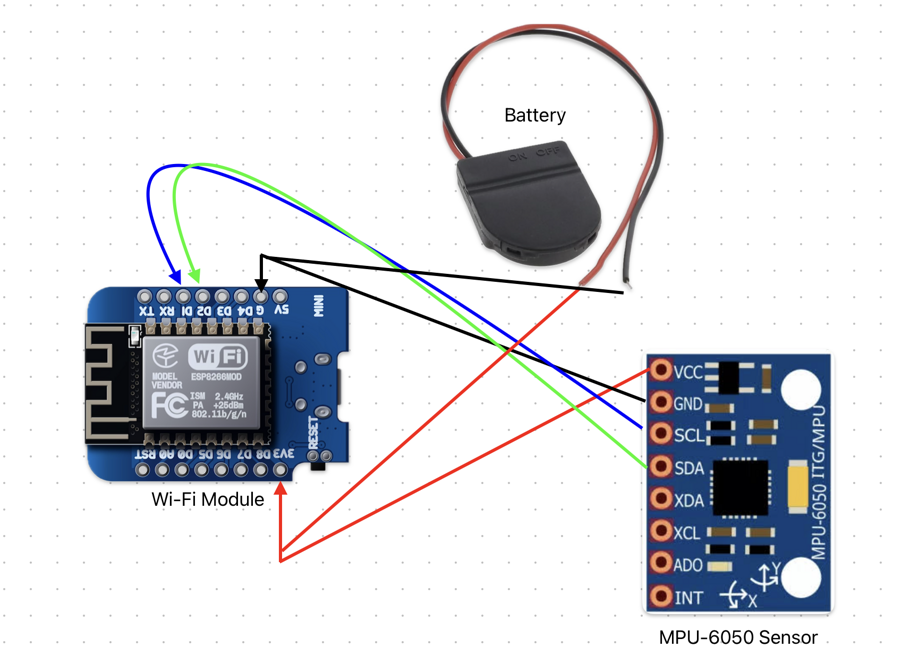
On the ESP8266 board running the Bowerino code, connect the MPU6050 as follows:


MPU6050 ESP8266

VCC → 3.3 V

GNDGND

SCL → D1

SDA →  D2


You can either solder the wires directly or use female-to-male connectors.

In my setup, I soldered a wire inside the MPU module’s loop and connected it to the corresponding pins on the ESP8266.


Step 3. Power Supply


Connect the 3.7 V battery to the Bowerino module:


Battery ESP8266

+ 3.3 → V

– → GND


Double-check the polarity before soldering!

Once connected, the sensor circuit will be autonomous and portable.


Step 4. Mounting on the Bow


There are two options for attaching the sensor to the cello bow:

Embedded: drill a small cavity in the bow and insert the sensor module inside.

Non-invasive: fix the module with strong double-sided tape or Velcro, so it can be removed easily.


This system can also be adapted to other instruments (bows, guitars, drumsticks, etc.).


Step 5. Connection and Operation


1. Turn on the Serverino module (connect it to power or via USB).

→ It will automatically create a Wi-Fi network visible from your computer.

2. Turn on the Bowerino module (powered by the battery).

→ It will automatically connect to the Wi-Fi network generated by Serverino.

3. On your computer, connect to the Wi-Fi network created by the ESP8266 (Serverino).


At this point, the two modules communicate with each other and transmit motion data via Wi-Fi.


Step 6. Receiving Data in Max/MSP


In Max, open the dedicated patch that receives OSC data from the module.

The patch displays in real time the acceleration and rotation values and can be linked to other functions (triggering, mapping, synthesis, etc.).


It also includes a 3D model that visualizes the bow’s movements in real time, and a connection to Wekinator for machine learning applications.


The Max patch can be downloaded [here].


Notes


This circuit was designed to fit the physical structure of a bow but can easily be customized.

It’s lightweight, battery-powered, and suitable for live performances where gesture becomes sound.


The circuit:

screenshot 2025-11-12 alle 15.40.19